.psk package into your \skins\ folder inside the player's installation directory,
then select it from Preferences → Skins. The player restarts with the new skin applied immediately.
How to Install
Download the skin
Click the Download button on any skin card below. You'll receive a .psk file.
Place in Skins folder
Move or copy the file into the \skins\ subdirectory of your Passion Audio Player installation.
Select in Preferences
Open Preferences → Skins, choose the skin from the list, and click Apply.
Available Skins
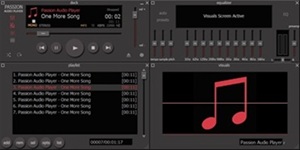


This is the Default skin of Passion Audio Player and it´s included here for demostration purposes to show you how will be the structure of this page.
Download Skin

This is another excellent skin for Passion Audio Player by Laurel Ferguson that reminds him of sails of boats.
Download Skin
This is an excellent skin for Passion Audio Player and it was created by Laurel Ferguson to help a friend of him with poor vision to see the player, that's why he called it VisionX.
Download Skin

This is a skin made by JM-DG made for the girl users of Passion Audio Player.
Download Skin
This is the first of the three skins that JM-DG made for Passion Audio Player. This is the BLUE skin.
Download Skin
This is the second of the three skins that JM-DG made for Passion Audio Player. This is the RED skin.
Download Skin
This is the third of the three skins that JM-DG made for Passion Audio Player. This is the CONTRAST skin.
Download Skin


Created a skin? Post it on the Skins forum section with at least one screenshot and a download link. If it's well-crafted and maintained, it may be listed here as an official skin. You can also contact George directly to discuss a submission.